Build your integration with an AI agent
Let ChatGPT, Claude, Claude Code or Cursor read the Velip docs and your system’s docs, and write the integration for you, or give you a step-by-step guide.
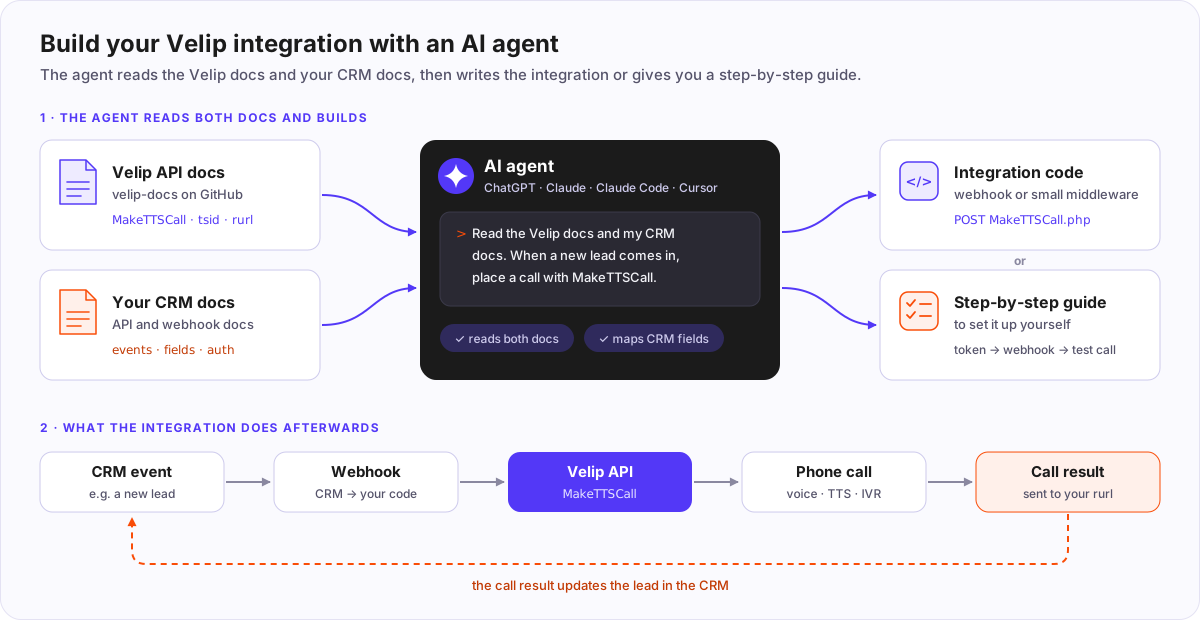
Most Velip integrations follow the same pattern. Something happens in your system (a new lead in the CRM, an overdue invoice, an appointment tomorrow), your system calls a webhook, and the webhook calls a Velip API: MakeTTSCall for a voice call, MakeSMS for SMS, MakeWhatsapp for WhatsApp. When the call ends, Velip can send the result back to your system.
Building this means reading two sets of docs, the Velip docs and your CRM’s docs, and mapping one onto the other. AI agents do this well. This repository is plain Markdown so that an agent can read it directly.
What you need
- A Velip account with API access and an API token (
tsid), created in the Velip portal on the integrations screen. See Authentication. - The API and webhook docs of your CRM (or ERP, e-commerce, helpdesk) and admin access to configure webhooks there.
- Your own phone number for the first tests.
- An AI agent:
| Agent | Best for |
|---|---|
| ChatGPT or Claude (chat, with web access) | A step-by-step guide and sample code. You do the setup. |
| Claude Code, Cursor or another coding agent | Writing, running and testing the code in your own project. |
How it works
- The agent reads the Velip docs (the key pages are listed below) and your CRM docs.
- It checks whether your CRM’s webhook can call the Velip API directly or needs a small piece of code in between. Many CRMs cannot send the token and the fields the Velip API expects, so a small middleware is common.
- It maps your CRM fields to Velip parameters: phone to
dest, contact name tonome, and so on. - It writes the code, or the steps to configure everything yourself.
- You test with your own number and then turn it on.
Example prompt
Copy one of the prompts below and fill in the parts in [brackets]. Ask the agent to explain each step before you run anything.
In Portuguese
Quero integrar o meu CRM com a Velip para fazer uma ligação automática
quando [EVENTO, ex.: um lead novo for criado].

1. Leia a documentação da Velip em https://github.com/velipbr/velip-docs,
   começando por:
   - docs/api/v2/getting-started.md
   - docs/api/v2/authentication.md
   - docs/api/v2/voice/MakeTTSCall.md
   - docs/api/v2/voice/GetCallStatus.md (resultado da ligação pelo rurl)
   - docs/api/v2/errors.md
   A URL base da minha conta é https://vox.velip.com.br.

2. Leia a documentação do meu CRM: [NOME DO CRM], [LINK DA DOCUMENTAÇÃO
   DE API E WEBHOOK].

3. Antes de escrever código, me diga:
   - se o webhook do CRM consegue chamar a API da Velip direto ou se
     precisa de um código intermediário, e onde hospedá-lo;
   - qual campo do CRM vai para cada parâmetro da MakeTTSCall;
   - o que mais você precisa saber de mim.

4. Depois, [escreva o código da integração | me dê o passo a passo para
   eu configurar], incluindo:
   - a mensagem falada: "[TEXTO, ex.: Olá <NOME>, aqui é da Empresa X...]";
   - proteção contra ligação repetida para a mesma pessoa (httpdup);
   - o tratamento dos códigos de erro da Velip;
   - o resultado da ligação de volta no CRM (rurl), atualizando
     [CAMPO OU ETAPA DO LEAD].

5. Use YOUR_TSID no lugar do token. Não me peça o token nesta conversa:
   ele fica numa variável de ambiente ou num campo seguro do CRM.

6. Termine com um teste de ligação para o meu número: [SEU NÚMERO].
In English
I want to connect my CRM to Velip so that a phone call is placed
automatically when [EVENT, e.g. a new lead is created].

1. Read the Velip docs at https://github.com/velipbr/velip-docs,
   starting with:
   - docs/api/v2/getting-started.md
   - docs/api/v2/authentication.md
   - docs/api/v2/voice/MakeTTSCall.md
   - docs/api/v2/voice/GetCallStatus.md (call result through rurl)
   - docs/api/v2/errors.md
   My account's base URL is https://vox.velip.com.br.

2. Read my CRM docs: [CRM NAME], [LINK TO ITS API AND WEBHOOK DOCS].

3. Before writing any code, tell me:
   - whether the CRM webhook can call the Velip API directly or needs
     a small piece of code in between, and where to host it;
   - which CRM field goes into each MakeTTSCall parameter;
   - anything else you need to know from me.

4. Then [write the integration code | give me the steps to set it up
   myself], including:
   - the spoken message: "[TEXT, e.g. Hello <NOME>, this is Company X...]";
   - protection against calling the same person twice (httpdup);
   - handling of the Velip error codes;
   - sending the call result back to the CRM (rurl), updating
     [LEAD FIELD OR STAGE].

5. Use YOUR_TSID instead of the real token. Do not ask me for the token
   in this chat: it goes in an environment variable or a secure CRM field.

6. Finish with a test call to my own number: [YOUR NUMBER].
Key pages for the agent
| Page | Why the agent needs it |
|---|---|
| Getting started | Base URL, request format, encoding, phone number format. |
| Authentication | The tsid token and the IP allowlist. |
| MakeTTSCall | Places the call: text or recorded audio, placeholders such as <NOME>, IVR, transfer, rurl. |
| GetCallStatus | The fields of the call result sent to your rurl. |
| Error codes | What each status_code means. |
| CreateCampaign | For many calls at once, instead of one request per record. |
If the agent cannot open GitHub pages, give it the raw files, for example https://raw.githubusercontent.com/velipbr/velip-docs/main/docs/api/v2/voice/MakeTTSCall.md. A coding agent can also clone the repository with git clone https://github.com/velipbr/velip-docs and read the docs/ folder.
Before going live
- Keep the token secret. Do not paste it into a chat, a code repository or code that runs in the browser. Store it in an environment variable or a secure field of your CRM. If it leaks, create a new one in the portal: the old one stops working at once.
- Review what the agent wrote. Agents make mistakes. Check the parameters against the docs and ask the agent to explain any part you do not understand.
- Test with your own number first, then with a small group, then turn it on for everyone.
- Avoid duplicate calls. CRMs often resend a webhook when the first attempt fails. Set
httpdup(up to 600 seconds) so that the same number is not called twice within that window. - Use
rurlfor the result instead of pollingGetCallStatus, which has rate limits. The result comes from35.232.103.91or35.184.30.236; if your endpoint filters by IP, allow both. - Restrict by IP when your middleware has a fixed IP address: add it to the allowlist described in Authentication.
- Call only people who agreed to be contacted, at reasonable hours.
Other channels
The same prompt works for SMS and WhatsApp. Replace MakeTTSCall with MakeSMS or MakeWhatsapp and point the agent to that page. On WhatsApp, a message to a contact who has not written to you in the last 24 hours must use an approved template: see GetWATemplates.
Tip: test from the agent with the MCP server
If you connect the Velip MCP server to Claude or Cursor, the agent can also place a test call or send a test message itself while it builds the integration. Your production integration still uses the REST API described above.